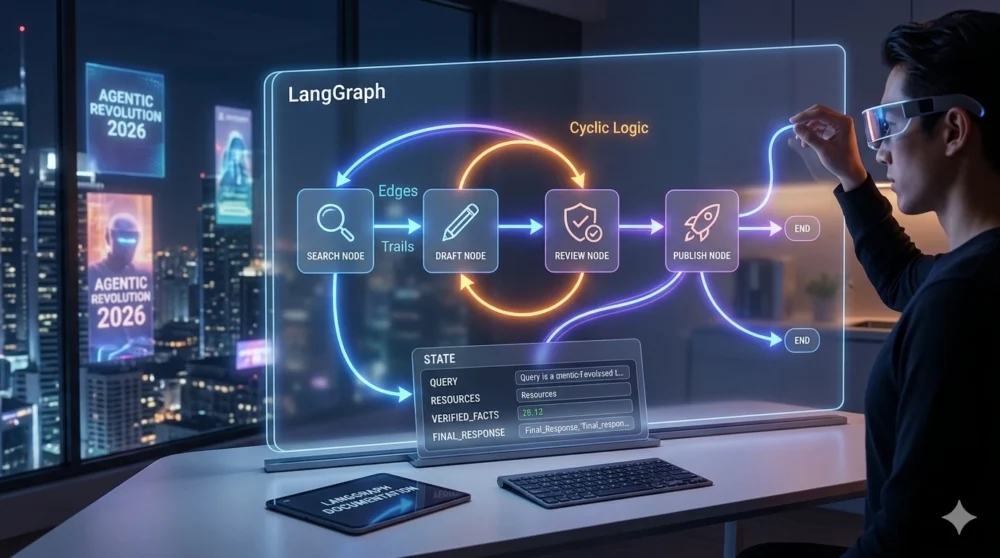
Introduction
Artificial Intelligence is changing from a simple answering tool into a working system.
In the early days of generative AI, many people used AI like a chat box. They asked one question and received one answer. That was useful, but it was limited.
Today, people want more than answers.
They want AI systems that can reason through a task, remember what has happened, use tools, make decisions, correct mistakes, ask for human approval, and continue from where they stopped.
This is where LangGraph becomes important.
LangGraph helps developers and AI builders create intelligent AI agents that do not just respond once and disappear. Instead, these agents can follow a workflow, move from one step to another, return to earlier steps when needed, and keep track of the current state of the task.
Think of it like this:
A normal chatbot gives a reply.
A LangGraph agent follows a process.
A normal AI prompt gives one result.
A LangGraph workflow can think, act, check, repeat, and improve.
That is why LangGraph has become one of the most important tools for building serious AI agents and agentic workflows. The official LangGraph documentation describes it as a framework for building stateful agents, with features like persistence, human-in-the-loop control, memory, and workflow orchestration.
This full class is written for beginners, students, developers, bloggers, freelancers, AI engineers, and anyone who wants to understand how intelligent AI agents work in 2026.
By the end of this class, you will understand what LangGraph is, why it matters, how its parts work, how to build your first agent, and how to think like an AI workflow engineer.
Before building agents, it is helpful to understand prompt structure first. Read:
AI Prompt Engineering Full Class 2026.
For practical tools, visit our
AI Tools Reviews.
What Is LangGraph?
LangGraph is a framework built for creating AI agents and workflows that can manage state, follow steps, use tools, loop when necessary, and continue working across multiple stages.
It is connected to the LangChain ecosystem, but it solves a different problem.
LangChain gives you many tools for working with language models, prompts, retrieval, tools, and integrations.
LangGraph helps you arrange those tools into a controlled workflow.
The official LangGraph documentation explains that graphs are made by composing nodes and edges, where nodes do the work and edges decide what should happen next. It also explains that this structure can create looping workflows that evolve state over time.
In simple terms:
LangGraph is used to build AI systems that can follow a process.
That process can be simple, like:
User question → AI answer → End
Or it can be advanced, like:
User request → Researcher agent → Fact checker → Writer agent → Human approval → Final response
The most important thing is that LangGraph gives your AI system a structure.
Why LangGraph Matters in 2026
AI is no longer only about generating text.
People now want AI to help with real tasks, such as:
researching documents, writing reports, checking facts, creating business workflows, handling customer messages, reviewing code, planning projects, answering questions from company files, and coordinating different AI agents.
These tasks are not always straight lines.
Sometimes AI needs to go back and check something again.
Sometimes it needs to pause and ask a human for approval.
Sometimes it needs to remember what happened earlier in the conversation.
Sometimes it needs to call a tool, check the result, and decide whether to continue or retry.
This is why LangGraph is important.
It allows AI builders to create workflows that are:
stateful, repeatable, controllable, debuggable, and suitable for more serious agent systems.
LangGraph also supports persistence, meaning agents can continue through failures or longer processes. The official documentation explains that persistence allows agents to resume from where they left off.
That makes LangGraph useful for real-world AI applications where a simple one-time prompt is not enough.
LangGraph in Simple English
Let us explain LangGraph like a real-life office.
Imagine you run an office with different workers.
One worker receives customer messages.
One worker researches the problem.
One worker checks the answer.
One worker writes the final reply.
One manager decides whether the work is ready or should go back for correction.
That is how LangGraph works.
The workers are called nodes.
The instructions that connect them are called edges.
The shared information they use is called state.
The decision points are called conditional edges.
The ability to pause and wait for a human is called human-in-the-loop.
The saved progress is called checkpointing.
When you understand these ideas, LangGraph becomes much easier.
LangGraph vs Normal Chatbot
A normal chatbot usually works like this:
User sends message → AI replies
That is simple, but it is not enough for complex tasks.
A LangGraph agent can work like this:
User sends request
↓
Agent checks the request
↓
Agent decides what tool to use
↓
Tool returns result
↓
Agent checks if result is good
↓
If result is poor, agent tries again
↓
If result is good, agent writes final answer
↓
Human can approve before final action
That is more powerful.
LangGraph is not just for chatting. It is for building AI workflows.
LangGraph vs LangChain
Many beginners ask:
“Should I learn LangChain or LangGraph?”
The answer is that both are useful, but they do different things.
LangChain helps you connect models, prompts, tools, retrievers, and data sources.
LangGraph helps you control the flow of the agent.
Here is a simple comparison:
| Feature | LangChain | LangGraph |
|---|---|---|
| Main purpose | Connect AI tools and models | Build controlled AI workflows |
| Flow style | Often sequential | Graph-based and cyclic |
| Best for | Simple chains, RAG, tool use | Agents, loops, multi-step workflows |
| State management | Can be manual | Built around state |
| Human approval | Possible but less central | Strong support through interrupts |
| Best beginner use | Prompt + model + retriever | Agent workflow with decisions |
In short:
LangChain gives you the tools. LangGraph gives you the workflow logic.
What Makes LangGraph Different?
The main difference is that LangGraph supports cycles.
A cycle means a workflow can go back to an earlier step.
For example:
The agent writes code.
The agent tests the code.
The test fails.
The agent goes back to fix the code.
The agent tests again.
The test passes.
The agent finishes.
That is a cycle.
Many normal workflows move in one direction only. But real thinking is not always one direction.
Humans think, try, check, correct, and try again.
LangGraph allows AI systems to behave more like that.
The Three Main Parts of LangGraph
To understand LangGraph, you must understand three main parts:
- State
- Nodes
- Edges
These are the foundation.
Class 1: Understanding State
State is the memory of the workflow.
It is the shared information that moves through the graph.
State can include:
user message, conversation history, search results, tool results, current status, approved or rejected decisions, final answer, error messages, and human feedback.
In LangGraph, state is very important because every node can read from it and write to it.
Think of state like a project file.
Every worker in the process can open the file, add their update, and pass it to the next worker.
Without state, your agent forgets what happened before.
With state, your agent can continue intelligently.
Simple Example of State
A customer asks:
“Can you help me write a refund email?”
The state may contain:
{
  "user_request": "Write a refund email",
  "tone": "polite",
  "draft": "",
  "approved": False
}
As the workflow moves forward, different nodes update the state.
The writer node may add the draft.
The review node may change approved to True.
The final node may return the email.
Class 2: Understanding Nodes
Nodes are the workers inside the graph.
A node is usually a function that performs one task.
For example:
Research node
Writing node
Review node
Tool-use node
Human approval node
Final answer node
Each node receives the current state, does something, and returns an update.
Example
A research node may search for information.
A writing node may write a draft.
A review node may check whether the draft is good.
A final node may prepare the final answer.
In simple English:
Nodes do the work.
The official LangGraph documentation also explains that nodes and edges are functions, and nodes are responsible for the work inside the graph.
Class 3: Understanding Edges
Edges connect nodes.
They tell the graph where to go next.
For example:
After the Research node, go to the Writer node.
After the Writer node, go to the Review node.
After the Review node, go to the Final node.
This is a normal edge.
Conditional Edges
Conditional edges are smarter.
They choose the next step based on the current state.
For example:
If the answer is approved, go to Final.
If the answer is not approved, go back to Writer.
This is what makes LangGraph powerful.
It allows AI systems to make decisions inside the workflow.
Class 4: Understanding Cycles
A cycle happens when the graph returns to an earlier node.
Example:
Writer → Reviewer → Writer → Reviewer → Final
This can happen when the first answer is not good enough.
Cycles are important because many AI tasks need improvement.
Examples:
code generation and testing, research and fact-checking, article writing and editing, customer reply approval, and document review.
Without cycles, the agent may fail once and stop.
With cycles, the agent can improve.
Class 5: Understanding Human-in-the-Loop
Human-in-the-loop means the workflow can pause and wait for human input.
This is very important for serious AI systems.
For example, an AI agent should not automatically:
send money, delete files, submit legal documents, send sensitive emails, approve refunds, or publish important content.
It should ask for permission first.
LangGraph supports human-in-the-loop workflows. The official documentation says human oversight can be added by inspecting and modifying agent state at any point.
LangGraph also has interrupts, which allow graph execution to pause and wait for external input before continuing.
This is useful when safety and control matter.
Class 6: Understanding Checkpointing
Checkpointing means saving the state of the workflow as it runs.
This allows the system to pause, resume, debug, or recover from failure.
The official LangGraph persistence documentation explains that checkpointers persist a thread’s graph state as checkpoints and can support conversation continuity, human-in-the-loop workflows, time travel, and fault tolerance.
Think of checkpointing like saving a game.
If something goes wrong, you do not need to start from the beginning.
You can return to a saved point.
This is very useful when building AI agents.
Class 7: Understanding Thread ID
A thread ID helps separate one user session from another.
If many users are using your agent, each user needs their own state.
For example:
User A may be asking about school assignments.
User B may be asking about business emails.
User C may be building a travel plan.
The graph must not mix them.
A thread ID helps keep each session separate.
This is important for chatbots, customer service agents, learning assistants, and business tools.
Class 8: LangGraph for Beginners — The Kitchen Analogy
Let us use a kitchen example.
Imagine a restaurant kitchen.
The customer gives an order.
The order ticket is the state.
The chef who cooks is a node.
The waiter who passes the food to the next station is an edge.
The head chef who checks whether the food is good is a review node.
If the food is not good, it goes back to the chef.
That return path is a cycle.
If the customer must approve a special request, the kitchen pauses.
That is human-in-the-loop.
This is how LangGraph works.
It turns AI work into an organized process.
Class 9: When Should You Use LangGraph?
You should use LangGraph when your AI application needs more than one simple answer.
Use LangGraph when you need:
multi-step reasoning, tool use, memory, review steps, human approval, retries, multi-agent collaboration, state tracking, or error correction.
Examples:
AI research assistant, AI coding assistant, customer support agent, document review agent, finance audit assistant, legal document helper, learning tutor, WordPress content workflow, and sales follow-up assistant.
You may not need LangGraph for very simple tasks.
If all you need is:
“Summarize this text”
or
“Write a short caption”
then a normal prompt may be enough.
But if you need a repeatable agent workflow, LangGraph becomes useful.
Class 10: LangGraph Use Cases in 2026
1. AI Research Agent
A research agent can:
receive a topic, search documents, summarize findings, check gaps, ask follow-up questions, and prepare a report.
2. AI Coding Agent
A coding agent can:
write code, run tests, check errors, fix bugs, and repeat until the code works.
3. AI Customer Support Agent
A customer support agent can:
read customer messages, classify the issue, retrieve policy, draft a reply, ask for human approval, and send the response.
4. AI Blog Writing Agent
A blog writing agent can:
generate topic ideas, create outline, write draft, check SEO, add FAQs, suggest internal links, and prepare publishing checklist.
5. AI Audit Agent
An audit agent can:
review receipts, compare policy, flag suspicious entries, ask for human clarification, and create final report.
6. AI Learning Tutor
A tutor agent can:
explain topics, ask questions, mark answers, repeat weak areas, and create a study plan.
Class 11: LangGraph and Multi-Agent Systems
A multi-agent system uses more than one agent.
Each agent has a role.
For example:
Researcher Agent
Writer Agent
Reviewer Agent
Manager Agent
The manager decides who should act next.
This is useful for complex tasks.
Example:
A user asks for a business plan.
The Researcher collects market ideas.
The Finance Agent estimates costs.
The Marketing Agent creates promotion strategy.
The Writer Agent prepares the final plan.
The Manager Agent checks everything.
LangGraph is useful for these systems because it allows different nodes and agents to work together inside a controlled flow.
Class 12: Supervised Multi-Agent Pattern
A supervised multi-agent pattern means one main agent controls other agents.
The main agent is like a manager.
It decides:
Who should work next?
Should the task go to researcher?
Should it go to writer?
Should it go to reviewer?
Is the answer ready?
This is useful because it prevents confusion.
Instead of every agent acting randomly, the supervisor organizes the flow.
Example:
User Request → Supervisor → Researcher → Supervisor → Writer → Supervisor → Reviewer → Final
This pattern is common in agentic workflows.
Class 13: Handoff Pattern
The handoff pattern means one agent passes work to another agent.
Example:
The Researcher Agent gathers information.
Then it hands the work to the Writer Agent.
The Writer Agent prepares the answer.
Then it hands the work to the Reviewer Agent.
The Reviewer Agent checks quality.
This is useful when each agent has a special skill.
In LangGraph, handoff can be represented using edges and conditional routing.
Class 14: Corrective RAG with LangGraph
RAG means Retrieval-Augmented Generation.
It allows AI to answer using external documents or search results.
Corrective RAG goes further.
It checks whether the retrieved information is good enough.
If the retrieved result is poor, the workflow can go back and search again.
Example:
User asks a question.
Retriever searches documents.
Evaluator checks if documents are relevant.
If relevant, answer the question.
If not relevant, rewrite search query and retrieve again.
This is a strong use case for LangGraph because it needs loops.
A normal linear chain may retrieve once and fail.
LangGraph can retrieve, check, retry, and improve.
Class 15: LangGraph Setup for Beginners
Before building a LangGraph agent, you need basic Python knowledge.
You should understand:
Python functions, dictionaries, lists, type hints, installing packages, API keys, and basic command line usage.
Installation
You can install the main packages with:
pip install -U langgraph langchain-openai langsmithDepending on your model provider, you may install other packages too.
For example, if you use Anthropic, Google, or local models, your setup may differ.
Class 16: A Simple LangGraph State Example
A basic state can be defined like this:
from typing import TypedDict

class AgentState(TypedDict):
    user_request: str
    draft: str
    approved: bool
This means the graph state will carry three things:
the user request, the draft response, and whether it is approved.
This is simple, but it shows the idea.
The state is the shared memory of the graph.
Class 17: A Simple Node Example
A node is a function.
Example:
def writer_node(state: AgentState):
    request = state["user_request"]

    draft = f"Here is a draft response for: {request}"

    return {
        "draft": draft
    }
This node reads from the state and returns an update.
It does not need to update everything.
It only returns what has changed.
Class 18: A Simple Review Node
A review node can check whether the output is good enough.
Example:
def review_node(state: AgentState):
    draft = state["draft"]

    if len(draft) > 30:
        return {"approved": True}

    return {"approved": False}
This is only a simple example.
In real projects, the review node may use an AI model, a rule, or human feedback.
Class 19: Conditional Routing Example
A router decides where the graph should go next.
Example:
def route_after_review(state: AgentState):
    if state["approved"]:
        return "final"

    return "writer"
If the draft is approved, go to final.
If not, go back to writer.
That creates a loop.
This is one of the most important ideas in LangGraph.
Class 20: Simple LangGraph Flow Example
A simple workflow may look like:
from langgraph.graph import StateGraph, START, END

graph = StateGraph(AgentState)

graph.add_node("writer", writer_node)
graph.add_node("reviewer", review_node)
graph.add_node("final", lambda state: state)

graph.add_edge(START, "writer")
graph.add_edge("writer", "reviewer")

graph.add_conditional_edges(
    "reviewer",
    route_after_review,
    {
        "writer": "writer",
        "final": "final"
    }
)

graph.add_edge("final", END)

app = graph.compile()
This graph:
starts with the writer, moves to reviewer, checks approval, either returns to writer or ends.
That is a simple intelligent workflow.
Class 21: Adding Human Approval
For serious workflows, you may want human approval.
Example:
AI writes an email.
Human checks it.
If approved, send.
If not approved, revise.
LangGraph supports this kind of pause-and-resume behavior using interrupts. The documentation explains that interrupts can pause graph execution and wait for external input before continuing.
This is important for workflows that involve:
payments, emails, publishing, customer replies, legal content, financial decisions, and sensitive information.
Class 22: Adding Tools to LangGraph
AI agents become more useful when they can use tools.
A tool can be:
search function, calculator, database, API, email sender, calendar, code runner, document retriever, or web scraper.
Example:
A travel agent may use:
flight search, hotel search, calendar, weather, and budget calculator.
A customer support agent may use:
order database, refund policy, email tool, and ticket system.
A research agent may use:
document search, web search, summarizer, and citation checker.
LangGraph helps you organize these tools into a process.
Class 23: Error Handling in LangGraph
Good AI agents should not fail silently.
They need error handling.
Example:
If API call fails, try again.
If search result is weak, search with another query.
If user input is missing, ask a follow-up question.
If confidence is low, ask for human review.
If loop repeats too many times, stop safely.
LangGraph workflows can include routing logic that responds to errors.
This makes agents safer and more reliable.
Class 24: Recursion Limit
A recursion limit prevents an agent from looping forever.
This is important because cycles can become dangerous if not controlled.
Example:
Writer → Reviewer → Writer → Reviewer forever.
A recursion limit stops this after a certain number of steps.
This protects your cost, time, and system stability.
Always design loops carefully.
A loop should have a clear stopping condition.
Class 25: Debugging LangGraph Agents
Debugging means finding out what went wrong.
With LangGraph, debugging is easier because you can inspect the state at different steps.
You can ask:
What did the agent know at this stage?
Which node changed the state?
Why did the router choose this path?
Did the tool return a bad result?
Did the model misunderstand the task?
LangSmith is often used for tracing LangChain and LangGraph applications.
Tracing helps you see what happened inside the agent.
This is useful when building production AI systems.
Class 26: Time Travel Debugging
Time travel means going back to a previous checkpoint.
This is useful when an agent made a mistake.
Instead of running everything from the beginning, you can inspect a previous state and continue from there.
LangGraph persistence documentation says checkpointers support time travel and fault tolerance.
This helps developers test and improve complex workflows.
It also reduces stress because you can understand where the agent went wrong.
Class 27: LangGraph for Blog Content Workflow
Since Gistrol teaches AI tutorials, let us use a blog workflow example.
Goal:
Build an AI assistant that helps create blog posts.
Workflow:
User enters topic.
Research node expands the topic.
Outline node creates structure.
Writer node writes draft.
SEO node adds title, slug, and meta description.
FAQ node creates questions.
Review node checks readability.
Human approves before publishing.
This is a good LangGraph project for beginners.
It teaches:
state, nodes, edges, routing, review, and human approval.
Class 28: LangGraph for Customer Support Workflow
A customer support agent can work like this:
Customer sends message.
Classifier node detects complaint, question, refund, or order issue.
Policy node retrieves business policy.
Reply node drafts answer.
Review node checks risk.
Human approval node pauses if needed.
Final node sends or displays response.
This is useful for small businesses.
It prevents poor customer replies and keeps humans in control.
Class 29: LangGraph for Coding Assistant
A coding assistant can use loops.
Workflow:
User describes coding task.
Planner node breaks task into steps.
Coder node writes code.
Tester node checks code.
If failed, go back to coder.
If passed, final node explains solution.
This is one of the strongest LangGraph examples because coding often requires retries.
The system can continue improving until the result passes.
Class 30: LangGraph for Research Assistant
A research assistant can work like this:
User gives topic.
Question node creates research questions.
Search node retrieves information.
Evaluator checks if information is useful.
If weak, search again.
Summarizer creates findings.
Writer prepares report.
Human verifies important claims.
This is useful for students, writers, analysts, and bloggers.
Class 31: LangGraph for Fintech Audit Agent
Imagine a company expense audit system.
A user uploads a receipt.
The graph checks:
receipt amount, category, policy, tax rule, approval status, and explanation.
If everything is clear, it approves.
If something is unclear, it pauses and asks a human.
Example workflow:
| Step | Actor | Action | State Update |
|---|---|---|---|
| 1 | User | Uploads receipt | receipt_uploaded: true |
| 2 | Extractor Node | Reads amount and category | amount: 5000 |
| 3 | Policy Node | Checks expense rule | policy_checked: true |
| 4 | Logic Node | Detects unusual amount | status: flagged |
| 5 | Human Node | Requests explanation | human_review: needed |
| 6 | Audit Node | Recalculates after note | status: approved |
| 7 | Final Node | Creates final report | report_ready: true |
This is a strong example of human-in-the-loop AI.
Class 32: Best Practices for LangGraph Beginners
Start Simple
Do not begin with a complex multi-agent system.
Start with one state, two nodes, and one conditional edge.
Use Clear State Names
Bad state name:
dataBetter state name:
customer_messageClear names make debugging easier.
Keep Nodes Small
Each node should do one clear task.
Do not put everything inside one node.
Add Human Review
For important actions, always add human approval.
Use Checkpointing
Checkpointing helps with memory, debugging, and recovery.
Control Loops
Every loop should have a stopping condition.
Trace Your Runs
Use tracing tools when building serious applications.
Class 33: Common Mistakes Beginners Make
Mistake 1: Building Too Much Too Early
Beginners often try to build a full AI company agent on day one.
Start small.
Mistake 2: Ignoring State
State is the heart of LangGraph.
If your state is poorly designed, the whole graph becomes confusing.
Mistake 3: No Clear Routing
Conditional edges must be clear.
The agent should know when to continue, retry, pause, or stop.
Mistake 4: No Human Approval
Do not allow AI to take risky actions without approval.
Mistake 5: Infinite Loops
Always protect your workflow from running forever.
Mistake 6: No Testing
Test each node separately before combining everything.
Mistake 7: Poor Tool Design
Tools should be clear, safe, and limited.
Do not give agents unnecessary power.
Class 34: LangGraph Learning Roadmap for Beginners
Follow this roadmap.
Step 1: Learn Python Basics
Understand functions, dictionaries, lists, type hints, and packages.
Step 2: Learn Prompt Engineering
You need good prompts before building good agents.
Step 3: Learn LangChain Basics
Understand models, prompts, tools, and retrievers.
Step 4: Learn LangGraph State
Understand how state carries information.
Step 5: Learn Nodes and Edges
Build a simple graph.
Step 6: Learn Conditional Routing
Make your graph choose paths.
Step 7: Learn Checkpointing
Save and resume workflow progress.
Step 8: Learn Human-in-the-Loop
Pause for human review.
Step 9: Build One Real Project
Start with a blog assistant, support agent, or research agent.
Step 10: Improve Into Multi-Agent System
Add specialized agents when you are ready.
Class 35: Beginner Project — Build a Blog Assistant Agent
This is a good first project.
Goal
Build an assistant that helps create blog posts.
State
class BlogState(TypedDict):
    topic: str
    outline: str
    draft: str
    seo_meta: str
    approved: bool
Nodes
Outline node
Writer node
SEO node
Review node
Final node
Flow
Start → Outline → Writer → SEO → Review → Final
If review fails, go back to Writer.
What You Will Learn
You will learn state, nodes, edges, condition, review, and loops.
This is a practical project for Gistrol readers.
Class 36: Beginner Project — Build a Customer Reply Agent
Goal
Build an agent that drafts customer replies.
State
class SupportState(TypedDict):
    customer_message: str
    category: str
    draft_reply: str
    needs_human: bool
Nodes
Classifier node
Policy node
Reply node
Risk checker node
Human review node
Final node
Flow
Start → Classifier → Policy → Reply → Risk Checker
If risk is high, go to Human Review.
If risk is low, go to Final.
This project is useful for business owners and freelancers.
Class 37: Beginner Project — Build a Research Agent
Goal
Build an agent that researches a topic and prepares a summary.
State
class ResearchState(TypedDict):
    topic: str
    search_results: list
    summary: str
    quality: str
Nodes
Question generator
Search node
Evaluator node
Summarizer node
Final node
Flow
Start → Search → Evaluator
If results are weak, go back to Search.
If results are useful, go to Summarizer.
This project teaches corrective retrieval.
Class 38: Recommended Video Tutorial Section
Add this section inside your post for readers who prefer visual learning.
Watch and Learn: LangGraph Video Tutorials
If you prefer video learning, you can search YouTube for:
Complete LangGraph Tutorial Beginner to Advanced 2026
Look for tutorials that teach:
LangGraph setup, state, nodes, edges, conditional routing, corrective RAG, checkpointing, human-in-the-loop, and multi-agent systems.
Good video topics to search include:
“LangGraph beginner tutorial”
“LangGraph state nodes edges tutorial”
“LangGraph multi agent tutorial”
“LangGraph human in the loop”
“LangGraph checkpointing tutorial”
“LangGraph corrective RAG tutorial”
Video learning is helpful because LangGraph becomes easier when you see the flow visually.
LangGraph Cheat Sheet
| Concept | Simple Meaning | Example |
|---|---|---|
| State | Shared memory | User request, draft, status |
| Node | Worker function | Researcher, writer, reviewer |
| Edge | Connection | Go from writer to reviewer |
| Conditional Edge | Decision route | If approved, final; if not, rewrite |
| Cycle | Repeat path | Write → review → rewrite |
| Checkpoint | Saved state | Resume from previous step |
| Interrupt | Pause point | Ask human approval |
| Thread ID | Session identity | Separate users |
| Tool | External action | Search, email, database |
| Agent | AI system that acts | Research assistant |
LangGraph Beginner Prompt
Use this prompt when learning:
“Act as a LangGraph teacher. Explain how to build a beginner AI agent using state, nodes, edges, and conditional routing. Use simple English, Python examples, and a step-by-step structure. Show how the agent can loop when the answer is not approved.”
Best LangGraph Project Ideas for Beginners
- Blog post assistant
- Customer support reply agent
- Research summary agent
- Coding test-and-fix agent
- Student study tutor
- Email approval assistant
- SEO content workflow agent
- FAQ generator agent
- Business proposal assistant
- Document review agent
Start with one.
Do not try to build everything at once.
Final Summary
LangGraph is one of the most important tools for building intelligent AI agents in 2026.
It helps you move from simple prompts to structured AI systems.
With LangGraph, you can build agents that:
remember state, follow workflows, use tools, make decisions, loop when needed, pause for human approval, recover from checkpoints, and work across multiple steps.
The most important concepts to understand are:
State, Nodes, Edges, Conditional Edges, Cycles, Checkpointing, Human-in-the-Loop, and Multi-Agent Patterns.
If you are a beginner, do not rush.
Start with a simple graph.
Build one state.
Add two nodes.
Connect them with edges.
Then add conditional routing.
After that, add loops, tools, checkpointing, and human approval.
That is how you grow from beginner to serious AI agent builder.
LangGraph is not just about writing code.
It is about designing intelligent workflows.
And in 2026, the people who understand AI workflows will be ahead of those who only know how to write simple prompts.
FAQs About LangGraph for Beginners
1. What is LangGraph?
LangGraph is a framework for building stateful AI agents and workflows using graph-based logic.
2. Is LangGraph part of LangChain?
LangGraph is connected to the LangChain ecosystem and is commonly used with LangChain tools, models, and integrations.
3. What is LangGraph used for?
LangGraph is used to build AI agents, multi-step workflows, multi-agent systems, corrective RAG pipelines, and human-in-the-loop applications.
4. Is LangGraph good for beginners?
Yes, but beginners should first understand Python basics, prompts, and simple AI workflows.
5. What is state in LangGraph?
State is the shared memory of the graph. It stores information that nodes can read and update.
6. What is a node in LangGraph?
A node is a function that performs a task inside the graph.
7. What is an edge in LangGraph?
An edge connects one node to another and controls the flow of the workflow.
8. What is a conditional edge?
A conditional edge chooses the next node based on the current state.
9. What is a cycle in LangGraph?
A cycle is when the workflow returns to an earlier node, usually to retry or improve the result.
10. Why are cycles important?
Cycles allow agents to correct mistakes, retry tool calls, improve drafts, and continue until a condition is met.
11. What is checkpointing in LangGraph?
Checkpointing saves the graph state so the workflow can resume, debug, or continue later.
12. What is human-in-the-loop?
Human-in-the-loop means the AI workflow can pause and wait for human review or approval.
13. What are interrupts in LangGraph?
Interrupts allow a graph to pause execution and wait for external input before continuing.
14. Can LangGraph use tools?
Yes. LangGraph agents can use tools such as search, calculators, APIs, databases, email tools, and document retrievers.
15. Can LangGraph build multi-agent systems?
Yes. You can create workflows where different agents handle different tasks.
16. Can I use LangGraph for RAG?
Yes. LangGraph is useful for RAG workflows, especially corrective RAG where the system checks and retries retrieval.
17. Can I use LangGraph for customer support?
Yes. You can build customer support agents that classify messages, retrieve policies, draft replies, and ask for approval.
18. Can I use LangGraph for blog writing?
Yes. You can build a blog assistant that creates outlines, drafts, SEO metadata, FAQs, and publishing checklists.
19. Is LangGraph free?
LangGraph is open-source, but you may pay for the AI model or API services you connect to it.
20. Does LangGraph support JavaScript?
LangGraph has JavaScript support through the LangGraph JS ecosystem.
21. What is a thread ID?
A thread ID separates one user session from another so their states do not mix.
22. What is the best first LangGraph project?
A simple blog assistant, customer reply agent, or research assistant is a good beginner project.
23. Do I need LangSmith?
You can learn without LangSmith, but tracing is helpful when debugging serious LangGraph applications.
24. Is LangGraph better than LangChain?
It is not about better. LangChain provides tools, while LangGraph provides workflow control.
25. What should I learn after LangGraph basics?
Learn tools, retrieval, checkpointing, human-in-the-loop, multi-agent systems, deployment, and monitoring.